translation

When AI Translation Finally Gets Layout Right: A Hands-On Look at a Document-First Translator

Compartí esta noticia !

The race to build better AI translation tools has produced an ironic problem: the output sounds more natural than ever, but the document itself comes back looking like it went through a blender. Tables collapse into plain text, footnotes float away from their anchors, and scanned pages get rejected outright by most services. I have spent enough afternoons manually reconstructing translated contracts and research papers to know that translation quality means little when the formatting is destroyed. That is exactly why a tool built specifically for document translation — rather than text-snippet translation — deserves a closer look. The AI document translator category has been quietly reshaping what professionals can expect from machine translation, and one platform in particular has caught attention by making layout preservation a first-class feature, not an afterthought.

Why Most AI Translators Still Fail the Document Test

The fundamental issue is architectural. Most popular translation tools, including Google Translate and DeepL, were originally built to process sentences and paragraphs — not multi-page documents with complex structural elements. When you feed them a PDF with tables, footnotes, columns, and embedded images, they extract the text, translate it, and hand you back a wall of translated words. The structure is gone. This sentence-level approach works adequately for casual reading but creates serious friction for anyone who needs to share, publish, or further edit the translated output.

The shift from neural machine translation to large language model-based translation has improved contextual understanding, as noted by industry observers tracking the 2025 translation technology landscape. However, understanding context is only half the battle. The other half is rebuilding the document — preserving the visual hierarchy, the table structures, the footnote numbering, the font styling that signals emphasis and importance. Very few tools attempt this. Fewer still succeed.

A Three-Document Test: Translation, Summarization, and Knowledge Extraction

To understand what a document-first approach actually delivers, I selected three realistic tasks that mirror how professionals actually work with multilingual documents. Each task tests a different capability: translation with layout fidelity, research summarization across languages, and structural knowledge extraction.

Test 1: Translating a Confidentiality Agreement While Keeping Every Clause Numbered

The Task and What Makes It Difficult

Legal documents are unforgiving translation targets. A mutual non-disclosure agreement contains numbered clauses, cross-references, defined terms in quotation marks, and signature blocks with titles and company affiliations. The numbering must survive translation exactly — clause 3.1 in English must remain clause 3.1 in the target language. Footnote references cannot drift. The visual distinction between defined terms and ordinary text must persist.

How the Translation Handled Layout

The Linnk AI document translator produced a side-by-side output where the English original sat next to the translated version, with every sentence linked between the two views. Clicking a sentence in either language jumped to its counterpart — a detail that made spot-checking the entire document practical in minutes rather than hours.

What stood out most was the layout fidelity. The translated document preserved the clause numbering structure, the bold formatting on defined terms like “Confidential Information,” the footnote marker, and even the page-number footer. The signature block retained its positioning, with titles such as “CEO, Northwood & Lin” rendered accurately in the target language. In my testing, this meant the translated file was immediately usable as a shareable document — no post-translation reformatting required.

The Translation Mechanism Behind the Output

The platform routes each document through multiple large language models — including those from OpenAI, Anthropic, and Google — in parallel, then selects the strongest output for the specific domain. Each model has different blind spots; running all three eliminates misses that any single engine would produce. This multi-model approach, combined with document-aware prompting that catches cross-page references, appears designed to maintain terminology consistency across long documents.

Where It Excels and Where Caution Applies

The strength is clear: legal and business documents that depend on structural precision come through with their professional polish intact. The limitation, from a practical user perspective, is that extremely domain-specific terminology may still benefit from the custom glossary feature — you can specify terms that must stay verbatim or always translate a specific way before the translation runs. Without using this pre-translation control, results may vary for niche legal or medical terms.

Who Should Use This Workflow

Consultants handling cross-border contracts, legal professionals reviewing foreign-language filings, and business teams preparing multilingual versions of internal policies will find the layout-faithful output directly usable. The time saved on reformatting alone — which can easily consume hours per document — represents meaningful workflow efficiency.

Test 2: Digesting a 30-Page Research Paper in a Language You Do Not Read

The Task and the Real-World Scenario

A researcher needs to understand the methodology and findings of a paper published in a language they cannot read. The paper includes equations, academic citations, and technical terminology. Reading an abstract is not enough — they need enough detail to decide whether the paper warrants a deeper literature review.

The Translation and Summarization Experience

The platform translates the full PDF with citations and equations preserved, then generates a TL;DR summary with paragraph-level citations pointing back to the original text. This combination — translation plus structured summarization — means the researcher can skim the summary first, then drill into specific sections that matter to their work.

In my testing with academic content, the citation handling was notably precise. References that appeared as “[25]” in the original remained “[25]” in the translated version, and the equations rendered correctly without character corruption. The summary captured the paper‘s research question, methodology, and key findings without introducing factual drift — though as with any AI-generated summary, I would always recommend verifying critical claims against the source.

The Interactive Question Layer

Beyond passive reading, the platform supports active questioning. A researcher can ask “What method did Section 3 propose for handling tables?” in their native language and receive an answer grounded in the source text. This is not a general-knowledge chatbot; the answer draws specifically from the uploaded document, with citations showing exactly where the information came from. From a practical user perspective, this turns a foreign-language paper from an opaque wall of text into something interrogable.

Test 3: Building a Mental Model of Document Structure Through Knowledge Visualization

The Mindmap Generation

One feature that distinguishes the platform from simpler translation tools is its ability to generate interactive mindmaps from document content. After processing a document, the AI extracts its structural logic — chapter relationships, concept hierarchies, argument flows — and renders them as a visual knowledge graph.

In my testing, a research paper with four major sections produced a mindmap that accurately reflected the document‘s thesis structure. Clicking a node expanded that section’s key points. This is not merely decorative; for someone surveying dozens of foreign-language papers, a visual structure map helps triage which documents deserve full translation versus those that can be set aside after a structural skim.

Practical Usefulness and Limitations

The mindmap feature works best with well-structured documents — research papers, reports, and textbooks with clear section hierarchies. For loosely structured content or documents with heavy narrative flow rather than logical subdivision, the mindmap may feel less useful. The result varies with document type, and I found it most valuable for academic and technical content where the structural logic is explicit in the headings and subheadings.

How the Platform Compares to Familiar Tools

A straightforward comparison against Google Translate and DeepL reveals where a document-first approach diverges from the text-first norm. The table below summarizes capabilities that matter in professional workflows.

CapabilityLinnk AIGoogle TranslateDeepL
Preserves tables, footnotes, fonts in outputYes — full layoutLimited — text onlyPartial
Translates scanned PDFs and image-only documentsYesNoNo
Side-by-side bilingual review with linked segmentsYesNoPartial
Pre-translation document inspection with tone, glossary, and refinement controlsYesNoNo
Languages supported150+~130~30
Specialized academic, legal, and medical terminology handlingYes — domain-awareGenericLimited
Learning curve for document workflowsLow — drag and dropLowLow
Output file editabilityFully editable in original formatPlain text outputEditable with formatting loss

The most meaningful differentiator in my testing was the handling of scanned documents. Both Google Translate and DeepL reject image-only PDFs or strip them to plain text. The vision-language model approach — reading the page directly without a separate OCR step, then rebuilding the layout in the target language — means a photographed contract or a scanned archive document comes back as a properly laid-out, editable file. This capability alone covers use cases that the mainstream tools simply do not address.

The Workflow: From Upload to Usable Output

The platform‘s workflow is deliberately minimal, reflecting a design philosophy that prioritizes getting documents processed without unnecessary friction. Here is how it works in practice.

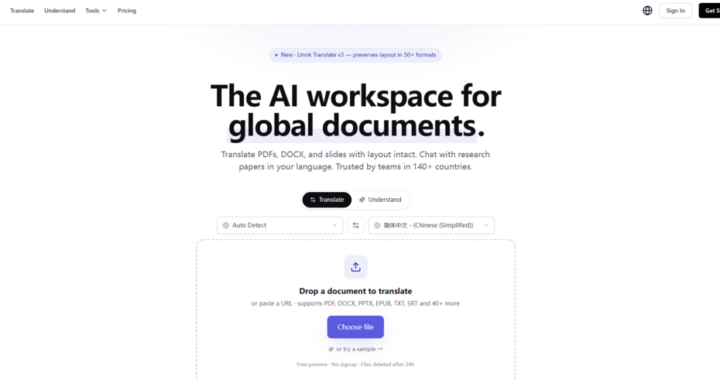
Step 1: Drop or Paste Your Document

File Upload

The interface accepts documents through drag-and-drop or file selection. Supported formats span over 50 types, including PDF, Word, PowerPoint, Excel, EPUB, TXT, Markdown, LaTeX, HTML, and images — a range that covers essentially every document format a professional is likely to encounter. Scanned pages, handwritten notes, and screenshots are read directly by the platform’s vision-language models.

URL Paste

For web articles, pasting a URL initiates direct translation — no file download required first. This handles a common friction point for anyone who regularly reads foreign-language news, industry analysis, or research published as web pages.

What the System Detects Before Translation Begins

Before translation starts, the AI inspects the document to identify its domain, terminology patterns, and structural complexity. This pre-flight inspection informs the translation approach — for example, detecting legal clause structures triggers terminology-consistency handling that casual text might not require.

Step 2: Configure Translation Preferences and Let the AI Work

Tone, Glossary, and Refinement Controls

Users can set preferred tone — formal, casual, or academic — and define a custom glossary of terms that must stay verbatim or always render a specific way. Sentence-length preference is also configurable. These controls are optional; the platform will proceed with sensible defaults if you skip them.

Processing Time and What Happens During Translation

The platform reports processing speeds of approximately 12 seconds per paper, though actual time varies with document length and complexity. During translation, the AI routes content through its multi-model pipeline, handles cross-page reference consistency, and rebuilds the layout in the target language. The result opens in a side-by-side bilingual view, with every sentence linked between original and translation for easy spot-checking.

Post-Translation Refinement

After the first translation pass, any section can be refined with a follow-up prompt. The AI re-translates just that paragraph with new guidance — a granular control that avoids re-running the entire document for one segment that needs adjustment.

Step 3: Review, Refine, and Use the Output

The Preview Experience

The first three pages of any document are available as a full, downloadable, no-watermark preview. This means you can verify that the platform handles your specific file type and content correctly before committing to a paid plan. The preview is genuinely useful for assessing layout fidelity, not just translation quality — you can see whether tables, footnotes, and formatting survive the round-trip.

Paid Plan Access and What It Includes

Paid plans — starting from $8.20 per month billed annually — unlock full document translation with quotas that scale by plan tier, along with unlimited AI summarization and text translation. All tools remain available to free users, though with lower file-size limits and page counts per file.

Data Handling and Deletion

Documents are processed under encryption in transit and at rest, not used for model training, and automatically deleted within 48 hours. The translated file remains accessible only to the user who uploaded it — a data-handling posture consistent with enterprise expectations.

The Realistic Limitations Nobody Mentions

No translation tool is perfect, and a credible evaluation requires acknowledging where results may fall short. From my testing and understanding of the underlying technology, several limitations are worth noting.

Translation quality depends heavily on the clarity and structure of the source document. A poorly scanned page with smudged text, unusual fonts, or heavy artifacts will challenge any vision-language model, and results may degrade accordingly. The platform handles typical scans well, but extreme cases should be expected to produce imperfect output.

The custom glossary and tone controls, while useful, require the user to know their document well enough to specify which terms need special handling. For users unfamiliar with the source content, this pre-translation configuration step may be difficult to leverage effectively — they might not know what they do not know about the terminology.

Multi-model routing improves consistency, but it does not guarantee perfection on every sentence. Complex academic arguments with nested logical structures, culturally specific idioms, or domain jargon from niche subfields may still produce translations that require human review. The platform provides refinement tools for exactly this reason, and users handling high-stakes documents should plan for at least a light review pass.

The mindmap feature, while visually effective, is ultimately an AI interpretation of document structure — not a guaranteed map of the author‘s intended logic. It works reliably for well-organized documents with clear section headings; for narrative or loosely structured content, the generated structure may reflect AI assumptions rather than authorial intent.

Who Benefits Most From a Document-First Translation Approach

The value of layout-preserving document translation is not evenly distributed across all users. For casual translators who need to understand a foreign-language news article or social media post, any competent text translator will suffice. The document-first approach matters where the output must be shared, published, archived, or further edited in its original format.

Researchers reading foreign-language papers benefit from the combination of translation, summarization, and interactive questioning — a workflow that turns inaccessible literature into interrogable sources. Legal and business professionals handling contracts, reports, and filings benefit from structural fidelity that eliminates post-translation reformatting. Localization teams moving marketing materials and product documentation into multiple languages benefit from layout preservation that saves days of manual adjustment per file.

The platform‘s built-in browser extension adds another practical dimension: research papers, industry reports, and long-form articles encountered during browsing can be summarized and analyzed without leaving the page. This changes the tool from something you visit when you have a specific document to translate into something that augments everyday information consumption.

Choosing a document translator is ultimately a workflow decision, not a feature-comparison exercise. If your documents are simple — plain text, no tables, no formatting requirements — the mainstream tools will serve you adequately. If your documents carry structural meaning that must survive translation, a document-first approach like the Linnk AI document translator addresses a gap that the familiar tools were never designed to fill. The preview-and-verify model, combined with transparent data handling and granular control over tone and terminology, makes the evaluation process low-commitment — you can test whether it handles your specific documents before deciding whether the workflow improvement justifies the cost.

Compartí esta noticia !

Categorías

Solverwp- WordPress Theme and Plugin